
LocalStack: Azure on your own laptop
LocalStack for Azure puts Azure on your own laptop. You get a local subscription where you create resource groups, deploy Bicep templates and test services such as AKS, Key Vault and Cosmos DB. No Azure bill, no waiting, no risk to production. Do you work with Azure as a DevOps engineer or platform engineer, or are you just curious? Then read on to see what you can do with it and how to get started in ten minutes.
Note: LocalStack for Azure is still in public preview. Locally, you can only create the Azure services that LocalStack already emulates. You'll find them below. If a service is not on that list, it does not work locally (yet). The preview is free; LocalStack expects the official release in early 2027.
Testing in the real cloud is slow and expensive
You probably know the feeling. You change one line in your Terraform or Bicep code and hit deploy. Then you wait. An Application Gateway in Azure easily takes fifteen minutes, an AKS cluster even longer. A typo? Start again.
The waiting is not the only problem. Every test environment costs money, even when you forget to clean it up. You need permissions on an Azure subscription you would rather not touch. And you don’t really want real cloud credentials in your CI pipeline.
LocalStack turns this around. You test locally, get an answer within seconds and throw everything away with one command. Only when it works do you move to the real cloud.
Your own Azure subscription, locally
LocalStack for Azure is a Docker container that emulates the Azure APIs. Your tools barely notice the difference. The Azure CLI, Azure PowerShell, Bicep, Terraform and Pulumi talk to localhost:4566 instead of Azure.
Start the emulator and you get a local subscription straight away. It is called Emulated Azure Subscription by LocalStack and its ID is 00000000-0000-0000-0000-000000000000. In it you create resource groups, just as you are used to with az group create or in the portal. No login needed: the emulator accepts any service principal.
Which services work today
During the preview you can only create the services on LocalStack’s list. In October 2026 these are:
- Management: Resource Manager, Resource Graph, API Management, Front Door and CDN
- Containers: AKS, Container Apps, Container Instances, Container Registry
- Serverless and hosting: Functions, App Service
- Data and storage: Cosmos DB (NoSQL and MongoDB), Azure SQL Database, PostgreSQL flexible server, Storage Account (blob, queue and table)
- Messaging: Service Bus, Event Hubs, Event Grid
- Security and identity: Key Vault, App Configuration, Managed Identity, RBAC
- Networking: VNets and subnets, private endpoints, private DNS zones, NAT gateway, public IP addresses, route tables, network interfaces, Bastion
- Monitoring: Azure Monitor, Application Insights, Log Analytics
If you build a hub-spoke network, a few important parts are still missing. Azure Firewall, VPN Gateway, Application Gateway, Load Balancer and network security groups are not on the list. Neither are Azure Policy and the Azure AI services. You still test those in the real cloud.
As an Azure architect, the first line is where I see the gain. The emulator accepts ARM and Bicep templates at resource group and subscription level. So you simply deploy your existing infrastructure code locally. Using Azure Verified Modules? Then first read where LocalStack stops.
LocalStack also exists for AWS and Snowflake. They work the same way, but this article is about Azure.
Six things you can do with it tomorrow
The strength of LocalStack is the feedback loop: from minutes to seconds. These are the uses I come across most often.
- Testing Bicep and Terraform. Deploy your infrastructure code to a local resource group. A mistake? Fix it and run again, without waiting fifteen minutes for Azure Resource Manager.
- Integration tests in your pipeline. Start LocalStack as a service in Azure DevOps or GitHub Actions. Every run gets a clean subscription, without real Azure credentials in your CI.
- Developing without an Azure connection. Your app talks to a local Blob Storage, Key Vault or Service Bus. Handy on the train, or when the corporate proxy gets in the way.
- A safe sandbox for AI agents. Let a coding agent loose on an Azure environment that costs nothing and can break nothing. LocalStack itself is investing heavily in this.
- Learning and demos. New colleagues practise with AKS or Functions without their own subscription. Done? Stop and start LocalStack and everything is gone.
- The Azure Portal on your laptop. Turn on
LS_AZURE_PORTAL=1and openhttp://localhost:4566/_localstack/portal/. You see your local subscription and resource groups in an emulated portal, just as you are used to.
Get started in five steps
You need Docker and a free account at app.localstack.cloud. The new command-line tool lstk takes care of the rest.
- Install lstk. Use Homebrew or npm:
brew install localstack/tap/lstk
# or
npm install -g @localstack/lstk
- Start the emulator. The first time, the tool logs you in through your browser and asks which emulator you want. Choose Azure (the
zkey). lstk then creates the configuration file itself, pulls the image and starts the container. The command returns once the emulator is running.
lstk start
- Turn on the portal. Open the configuration file with
lstk config path. Check that the type is set toazureand add the portal:
[[containers]]
type = "azure"
tag  = "latest"
port = "4566"
env  = ["portal"]

[env.portal]
LS_AZURE_PORTAL = "1"
Watch that line env = ["portal"]. If you forget it, the profile exists, but the container does not use it. Then restart the emulator so it picks up the new setting:
lstk restart
- Create your first resource. Connect the Azure CLI to LocalStack once and off you go:
lstk setup azure
lstk az account show
lstk az group create --name demo-rg --location westeurope
lstk az deployment group create --resource-group demo-rg --template-file main.bicep
az account show shows your local subscription. Then you create the resource group demo-rg and deploy your own Bicep file into it. Did it work? Then your own Azure is running on your laptop. Open the portal at http://localhost:4566/_localstack/portal/ and have a look around. Use localhost, not 127.0.0.1, or the page stays blank.
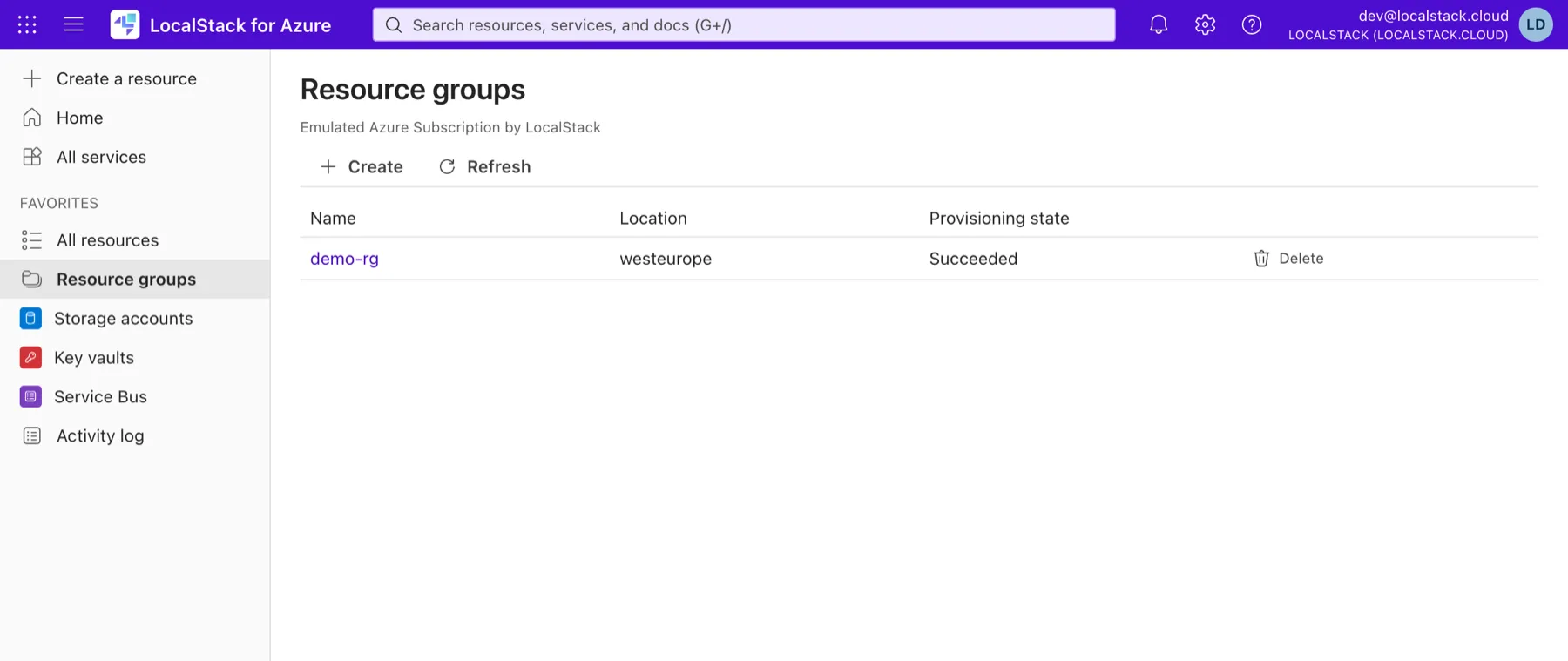
- Check the logs. Did a deployment fail? The emulator logs show what went wrong. With
--followyou watch live while you deploy, and--tail 100shows only the last 100 lines:
lstk logs --follow --tail 100
Where LocalStack stops
An emulator is not a cloud. LocalStack emulates the API, not every detail of the behaviour behind it. So always test in the real environment as well before you go to production.
Also keep these points in mind:
- Not everything works, even within a service. Every Azure service has a page listing what does and does not work. You can create API Management, for example, but traffic does not pass through the gateway.
- Azure Verified Modules don’t work yet. As of 16 October 2026 (LocalStack 2026.11.0.dev105), every deployment with a module from the AVM registry (
br/public:avm/...) fails. The emulator can’t yet handle parameters that use a user-defined type, such asparam lock lockType?. Almost every AVM module has such parameters. The deployment then stops withKeyError: 'type'in the logs. If you build with AVM, you still test it in the real cloud. - No management groups. Deployments only work at resource group and subscription level. So you cannot test a full landing zone locally yet.
- One subscription, one tenant. Scenarios across multiple subscriptions, such as a hub-spoke spread over separate subscriptions, are outside the emulator’s scope.
- Still in preview. Snapshots, App Inspector and chaos tests are not included yet. Pricing follows at the official launch, expected in early 2027.
- Account required. You need a LocalStack account and an auth token. During the preview you pay nothing.
My advice: start small
LocalStack does not change what you build, but how quickly you know whether it works. Pick one pain point, for example that slow Bicep deployment. Run it locally for a week and measure the difference.
Now is the time to get on board. The preview is free and your feedback still counts. Start the emulator, create a resource group in your local subscription and deploy your first Bicep template.
Wondering whether LocalStack fits your pipeline or landing zone? Get in touch and we’ll look at it together.